
As businesses expand from 10 employees to 50, 100, or more, the ad-hoc computer equipment, consumer routers, and shared passwords that worked in the early days quickly become serious operational liabilities.
Without disciplined architectural planning, rapid headcount growth results in frequent network slowdowns, unmanaged security exposures, and chaotic troubleshooting. This checklist establishes the five foundational pillars every growing enterprise must implement to maintain stable, secure, and expandable technology operations.
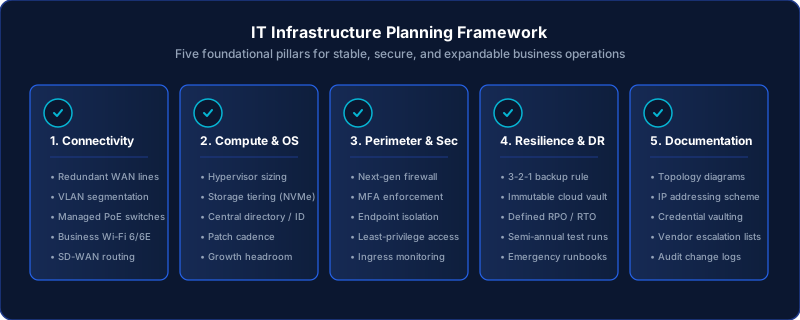
Figure 1: The five core pillars of a resilient, scalable business IT infrastructure.
Pillar 1: Network Resilience & Connectivity
A single internet outage or localized switch failure can bring an entire company's workflow to a complete halt. Ensure your network foundation has built-in redundancy:
- Dual-Carrier WAN Failover: Contract a secondary internet connection from an entirely different carrier (e.g. primary fiber paired with secondary dedicated cellular 5G or broadband). Configure automatic failover on your edge firewall.
- Managed PoE Gigabit Switching: Replace unmanaged consumer desktop switches with enterprise managed switches featuring Power over Ethernet (PoE) for access points and VoIP phones.
- VLAN Subnet Segmentation: Isolate corporate workstations, VoIP phones, guest Wi-Fi, financial servers, and building IoT into separate, non-overlapping subnets with strict routing controls.
- Commercial Business Wi-Fi: Deploy centrally managed access points with channel auto-tuning and 802.1X enterprise authentication, eliminating shared Wi-Fi passwords.
Pillar 2: Centralized Identity & Device Governance
Managing computer logins on individual machines is impossible to maintain securely once an organization passes 15 team members.
- Central Directory Authority: Enforce all user authentications through an enterprise identity provider (Active Directory, Azure AD / Microsoft Entra ID, or Okta).
- Universal Multi-Factor Authentication (MFA): Mandate MFA for all remote access gateways, corporate email accounts, and administrative logins.
- Standardized Endpoint Baselines: Enforce full-disk encryption (BitLocker / FileVault) across all laptops to protect corporate data if hardware is lost or stolen.
- Automated Offboarding Workflows: Establish documented technical checklists to revoke access, terminate VPN certificates, and wipe corporate data immediately upon employee departure.
Pillar 3: Perimeter Hardening & Defensive Security
Effective defense begins at the network perimeter and extends inward through structured boundaries:
- Next-Generation Firewall (NGFW): Replace consumer router firewalls with an enterprise gateway providing deep packet inspection, intrusion prevention (IPS), and automated threat signature updates.
- Zero Exposed Administrative Ports: Ensure no internal services (such as RDP port 3389 or SSH port 22) are directly exposed to the public internet. Require secure VPN or Zero-Trust Network Access (ZTNA) gateways.
- Least-Privilege Access Controls: Remove local administrator rights from standard employee workstations to prevent unauthorized software installations and malware persistence.
Pillar 4: Verified 3-2-1 Backup & Disaster Recovery
Backups are your ultimate safety net against ransomware, accidental deletions, and catastrophic hardware failures:
- 3-2-1-1-0 Rule Compliance: Maintain 3 copies of business data on 2 different media formats, with 1 copy off-site in an immutable cloud vault, 1 copy air-gapped, and 0 recovery errors during automated tests.
- Immutable Cloud Target: Configure offsite cloud backups with write-once-read-many (WORM) retention locks so snapshots cannot be deleted or encrypted by ransomware.
- Documented RPO & RTO: Explicitly define acceptable Recovery Point Objectives (e.g. lose no more than 4 hours of data) and Recovery Time Objectives (e.g. restored within 2 hours).
- Semi-Annual Restoration Drills: Perform test restores to isolated sandbox environments at least twice per year to verify that backed-up servers actually boot and function.
Pillar 5: Comprehensive Infrastructure Documentation
Undocumented systems create extreme business vulnerability. If your primary technician or vendor becomes unavailable, your business must retain complete operational visibility:
- Visual Network Topology Maps: Maintain up-to-date diagrams showing all physical switches, firewalls, servers, VLAN IDs, and circuit demarcations.
- Encrypted Credential Vault: Store all master administrative credentials, SNMP strings, and router passphrases in a centralized, multi-factor protected password vault.
- Asset & Warranty Registry: Maintain an active spreadsheet or CMDB tracking serial numbers, purchase dates, warranty expiration dates, and assigned users for all equipment.
- Disaster Recovery Runbook: Keep a step-by-step printed and digital runbook detailing recovery procedures, carrier escalation contacts, and vendor account numbers.
Planning for Expansion?
Implementing these foundational controls before rapid scaling avoids costly emergency refactoring later. Gridwell Tech assists organizations in evaluating their infrastructure readiness and establishing phased engineering plans.
Building Your Infrastructure Roadmap
A growing organization does not need to deploy every enterprise technology overnight. The key is establishing a prioritized 12-to-24 month technical roadmap that addresses the highest-risk single points of failure first.
Explore our IT Infrastructure Consulting and Managed IT Advisory services to learn how we help growing businesses navigate these milestones with confidence.